
Apache Iceberg: Fundamentals and Practical Walkthrough
Apache Iceberg basics explained through practical hands on with pyspark and spark sql.
1. TL;DR/ Summary#
Apache Iceberg™ is an open-source high-performance table format that brings Data Warehouse-level reliability to Data Lakes. It supports ACID transactions, Time Travel, and Schema Evolution across multi-engine environments like Spark, Trino, and Flink. By using a snapshot-based metadata tree (Metadata File Manifest List Manifests), Iceberg eliminates expensive file listing and enables massive query performance gains.
2. What is Apache IcebergTM?#
Apache IcebergTM is an Open Table Format Specification for huge analytic tables with reference implementations in Java, Python, Rust, Go and C++. This specification defines how a table’s data, metadata, properties and lifecycle are structured, stored, and managed, and it continues to evolve with new features introduced in each release. In addition, Iceberg also has specifications for catalogs, views, partitions and encryption with new ones being added as Iceberg evolves. Iceberg is actively developed with new features, the best place to learn about the latest capabilities is the official documentation ↗.
Apache IcebergTM was created to address the limitations of Data Lakes and add functionality available in DataWarehouse to Date Lakes in an architecture that is called a Data LakeHouse.
A data warehouse is a centralized system that stores structured, cleaned, and historical data, optimized for fast analytics and reporting.
Data warehouses offered
- Reliability: by offering ACID (Atomic, Consistent, Isolated & Durable) transactions, schema-on-write, tightly coupled storage and compute, managed by a single system.
- Fast Queries: because data was highly organized, optimized upfront, and tightly integrated with the query engine.
- Strong Governance: by validating, controlling, and auditing data before and after it was stored.
But DataWarehouse were vendor locked, expensive, rigid and only stored structured data.
A Data Lake is a massive, centralized storage repository that holds vast amounts of data in its raw, “natural” format.
DataLakes brought cheap, scalable storage and flexibility of data types but lacked transactions, schema management, and performance guarantees offered by DataWarehouses.
Apache IcebergTM evolved to combine the strengths of both: it runs on low-cost data lake storage while providing datawarehouse like features.
3. Apache IcebergTM Features That Make Data Lakes Reliable#
Below are the key features that make Apache IcebergTM a strong foundation for modern analytics.
ACID Transactions with Snapshots#
Iceberg natively provides single-table ACID transactions using a snapshot-based model. Every write operation creates a new, immutable snapshot. Readers always see a consistent view of the table, and failed writes never leave the table in a partial state. Multi-table transactions can be achieved using a Project Nessie catalog.
Time Travel and Rollbacks#
Because snapshots are retained, Iceberg allows time travel. You can query a table as it existed at a specific point in time or at a particular snapshot or roll back to a previous snapshot. This is invaluable for debugging, auditing, governance and recovery.
Safe Schema Evolution#
Iceberg supports schema evolution without rewriting data. Columns can be added, removed, renamed, or reordered safely. Internally, Iceberg tracks columns by IDs instead of names, which prevents data corruption during schema changes. Read more here ↗
Partition Evolution and Hidden Partitioning#
Iceberg allows partitioning to evolve over time. Iceberg partitions tables using metadata (partition specs and manifest entries), not directory structure. Old data keeps its original partition layout, while new data uses the updated one. In some cases partitioning is hidden from users, queries are written against logical columns, for example for date based column partition, Iceberg offers transforms to create month/day/year based partition internally and partition pruning is applied automatically.
Row-Level Deletes and Updates#
Iceberg supports efficient DELETE, UPDATE, and MERGE operations using delete files and delete vectors. This avoids rewriting large data files and enables fine-grained data changes at scale.
Efficient Metadata for Fast Queries#
Iceberg uses manifest files and manifest lists to store metadata such as partition information and column-level statistics. This allows query engines to skip irrelevant data files during planning, significantly improving query performance.
Optimizer-Friendly Statistics#
Beyond basic statistics, Iceberg can store advanced metrics such as NDV (number of distinct values) sketches in optional Puffin files. These statistics help query engines make better optimization decisions, especially for joins. Sketches implement algorithms that can extract information from a stream of data in a single pass.
Multi-Engine and Storage Independence#
Iceberg works consistently across multiple engines, including Spark, Trino, Flink, and Hive. It supports common file formats like Parquet and ORC and runs on object storage or distributed file systems, fully decoupling compute from storage.
Scalable File and Lifecycle Management#
Iceberg provides built-in operations for compaction, snapshot expiration, and orphan file cleanup. These features keep tables efficient and prevent metadata and storage bloat as datasets grow.
Pluggable Catalogs and Governance#
Iceberg supports multiple production-ready catalogs, including Hive, AWS Glue, REST catalogs, and Project Nessie. Catalogs enable atomic commits, namespace management, and depending on the implementation, git like branching and tagging.
4. Behind the Scenes: Table Specification#
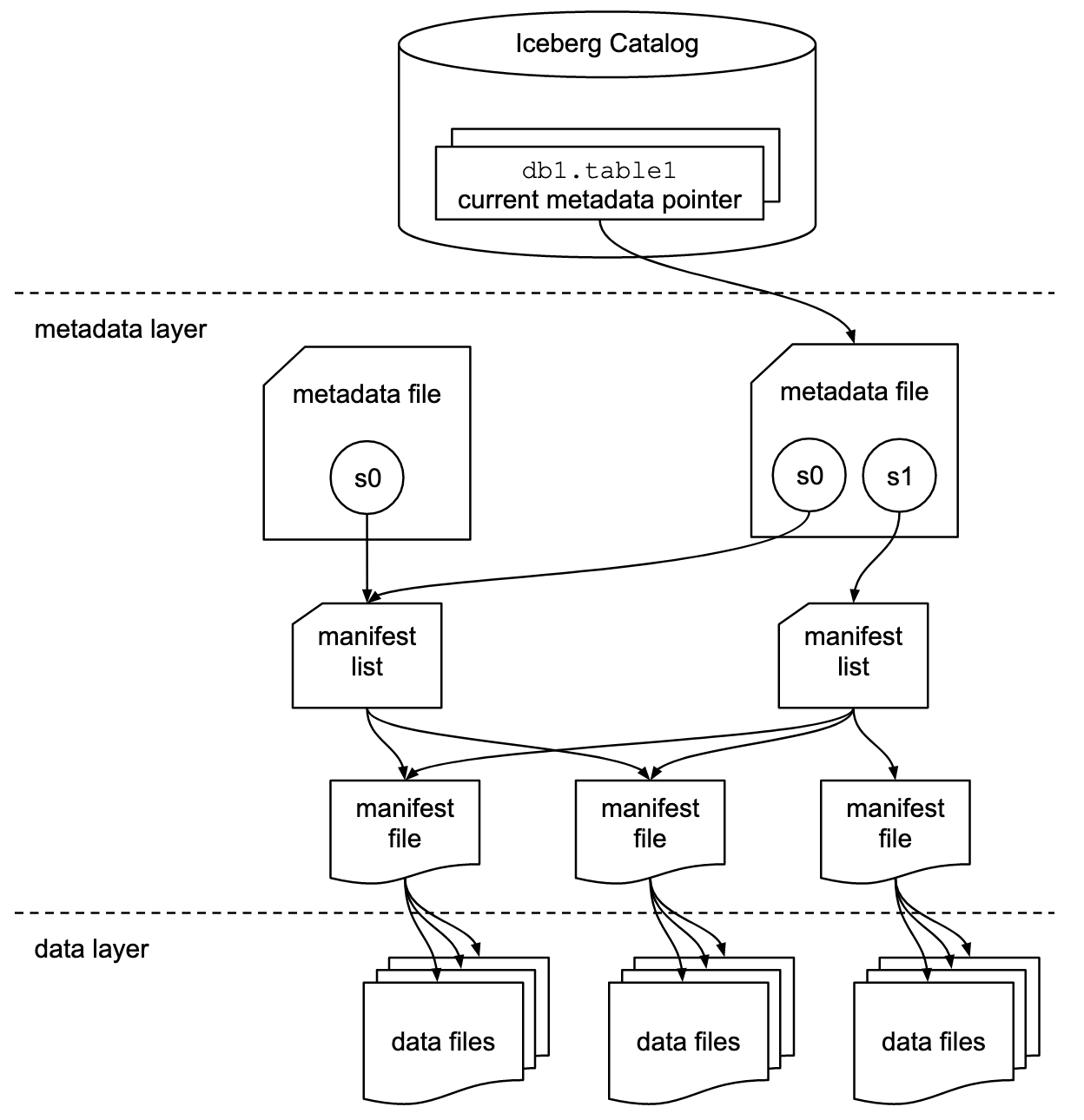
An iceberg table is defined as a list of data files. Iceberg then use layers of metadata defined in files to optimize operations on the table. There are three layers to any iceberg table: Data, Metadata and the Catalog, as can be seen from the below diagram from the official specification ↗
Data Layer#
Data Layer stores the data files as you can see from the above architecture diagram. The data layer, in practice could be backed by a distributed object store such as Amazon Simple Storage Service (S3) ↗. Data Layer also stores delete files which tracks records that have been deleted in a table.
Data Files#
Datafiles store the data. As per the
Apache IcebergTM spec ↗,
iceberg is file format agnostic and currently
supports Apache Parquet ↗, Apache ORC ↗, and Apache Avro ↗. Being file format agnostic is advantageous because one can choose the file format suitable for their workloads and in case newer better performing file formats are developed, you can use that format with Apache IcebergTM.
In practice Apache Parquet is used for Analytical Workloads because its columnar
structure provides large performance gains over row-based file formats like Apache Avro ↗, and enjoy wide support across all popular processing engines.
Delete Files#
Apache IcebergTM treats storage as immutable, so no changes are applied to Data Files in-place. Either a new version of the data file(s) with applied changes ( delete, updates inserts ) or a delete file, that only has the changes written, can be created. These strategies are called Copy-On-Write (COW) and Merge-On-Read (MOR) respectively and affects the read and write speed from a table .
To identify rows that should be deleted from a table, either their position or the value of one or more field of a row could be listed resulting in two types of Delete files:
-
Positional delete files list exact position of the rows to be removed from the table.
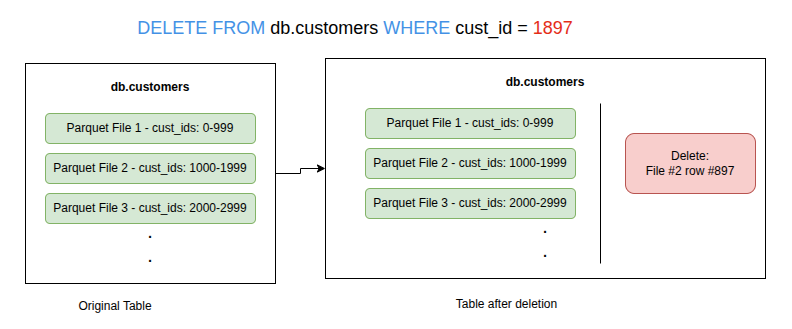
Positional Delete File Example. -
Equality delete files list value of one or more column/field of the row.
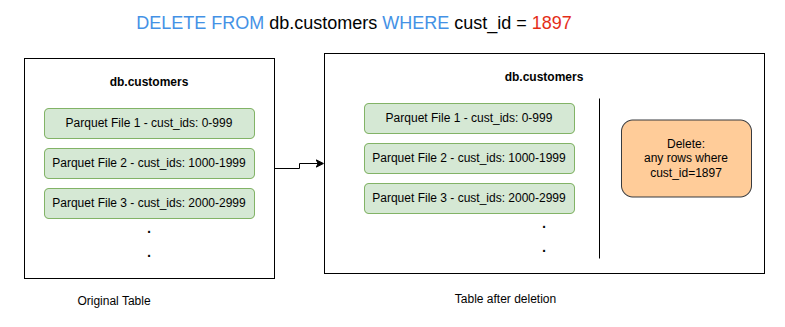
Equality Delete File Example.
The Metadata Layer#
The idea of Apache IcebergTM is to allow faster query speeds on huge tables and the metadata layer is what enables it. The Metadata Layer is made up of mainly three file types, all of which are co-located with the datafiles.
-
manifest files track both the data and delete files separately i.e each manifest file can track either delete files or data files. They also store additional details and statistics about each file, such as the minimum and maximum values for a table’s columns.
Each manifest file tracks a subset of data files and stores metadata such as partition information, record counts, and column-level lower and upper bounds. These statistics are used to improve read efficiency and performance. Although some of this metadata also exists within the data files themselves, a manifest file aggregates these statistics across many data files. This allows query engines to prune large numbers of data files without opening them, which significantly improves performance. Even reading only the footers of many data files can be expensive. The statistics in a manifest file are generated by the writing engine or tool at write time for the group of data files that the manifest file represents. -
manifest list, lists all the manifest files that represent the state of the table at a particular point in time. This state is called a Snapshot. Any changes to the table creates a new Snapshot by creating and referencing a new manifest list file. So an Iceberg table goes through a series of Snapshots similar to a git commit.
-
metadata file tracks table level abstraction/metadata such as table schema, partitioning config, custom properties, all of its snapshots.
-
Puffin Files store some statistics which will be too expensive or unrealistic to store in manifest files. For example they are used to store Number of Distinct Values (NDV) in a probabilistic data structure to estimate distinct values of a column in the table without scanning the whole table.
The Catalog#
It manages the table namespaces and offers database like grouping to tables. It is a central place which stores pointers from the table names to the current location of their respective current metadata file. The primary requirement for an Iceberg catalog is that it must support atomic operations for updating the current metadata pointer. Atomic operations mean either changes to table fully succeeds and the table state is updated, or they fail and leave the table unchanged by not swapping the pointer to metadata file..The catalog acts as the “directory service” for Iceberg tables. The catalog provides the transactional capabilities to Iceberg. Since the Catalog is an open specification, there are many production ready implementations available today offering variety of features.
5. Read and Write Operations explained#
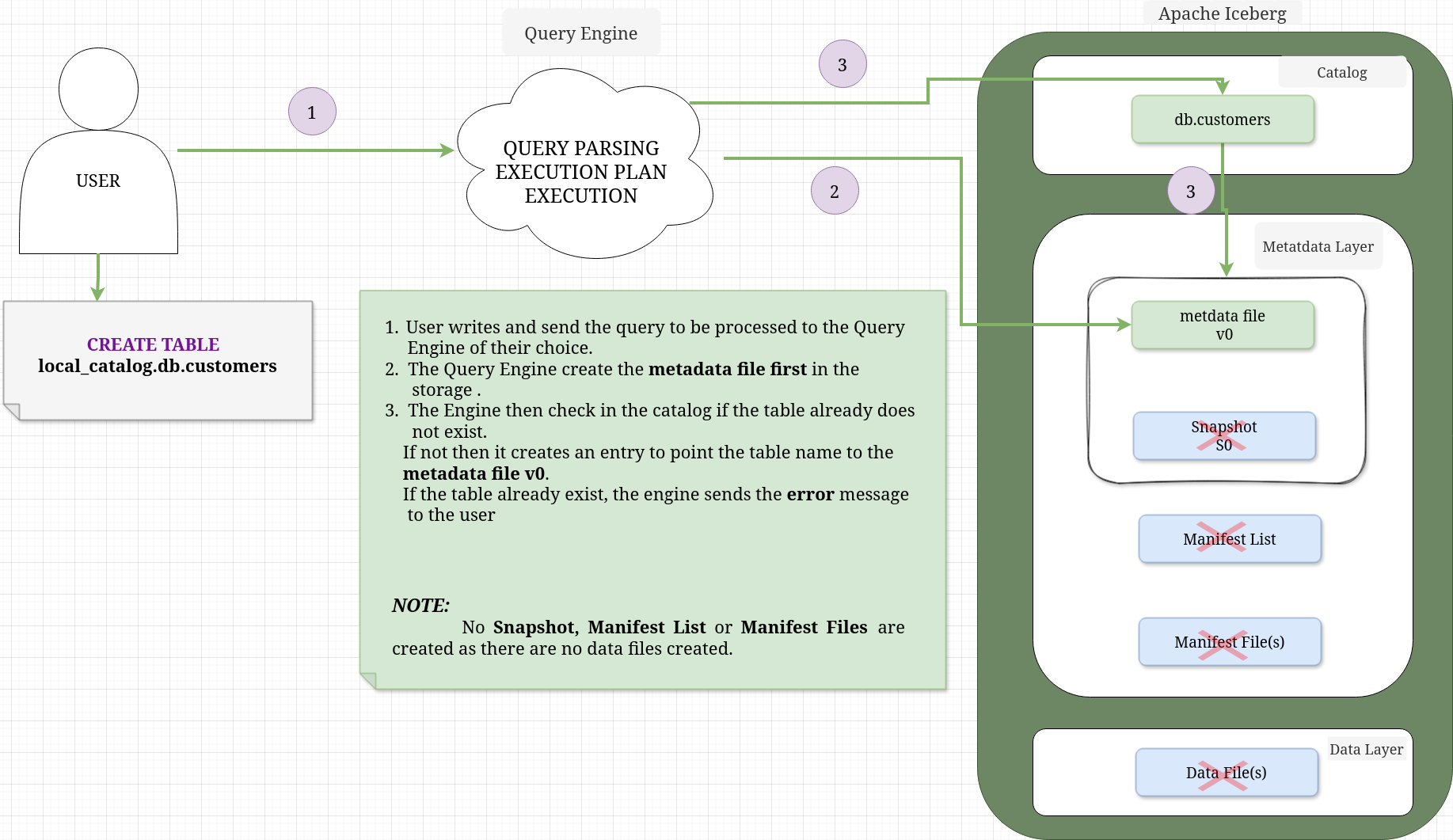
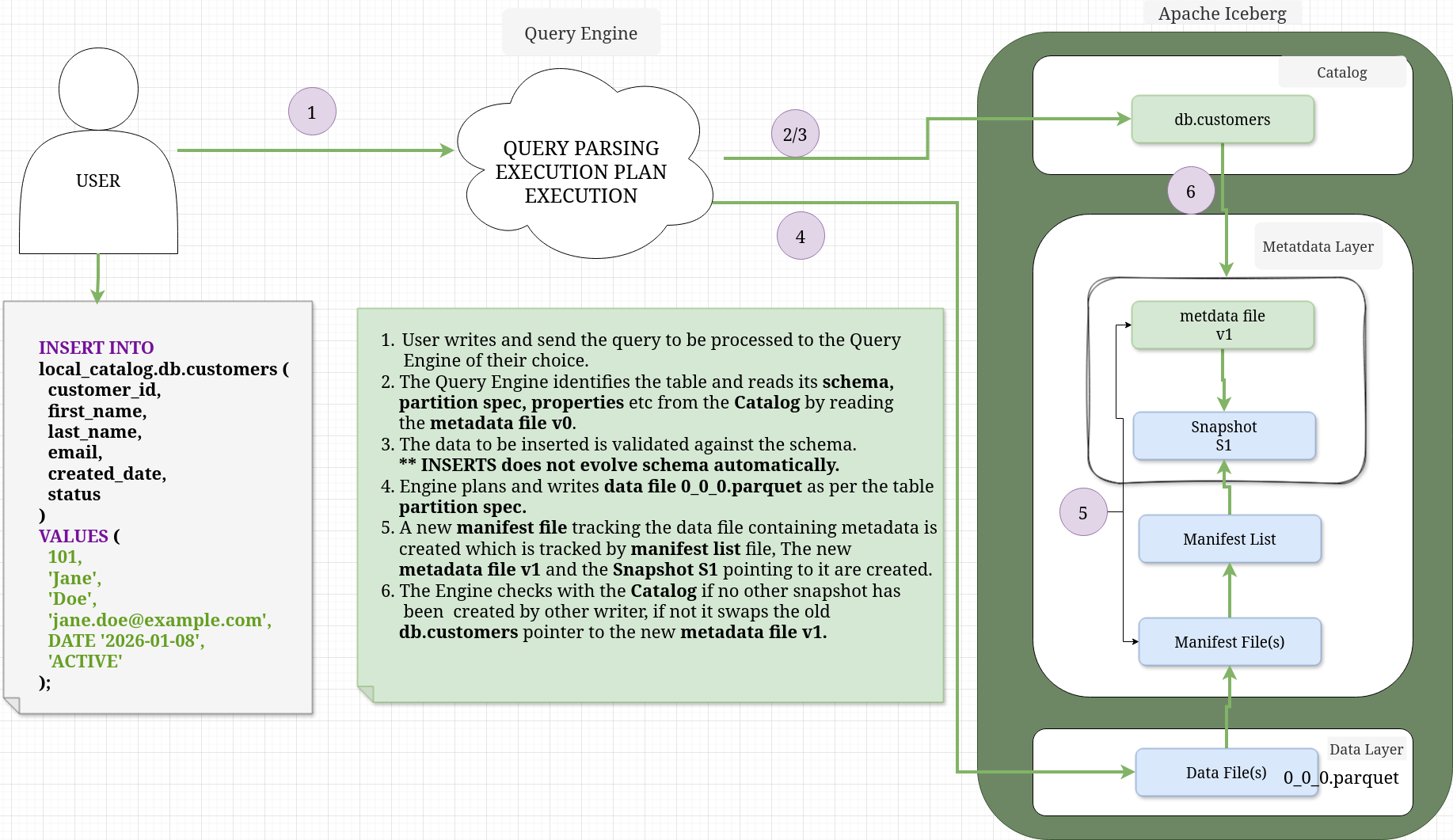
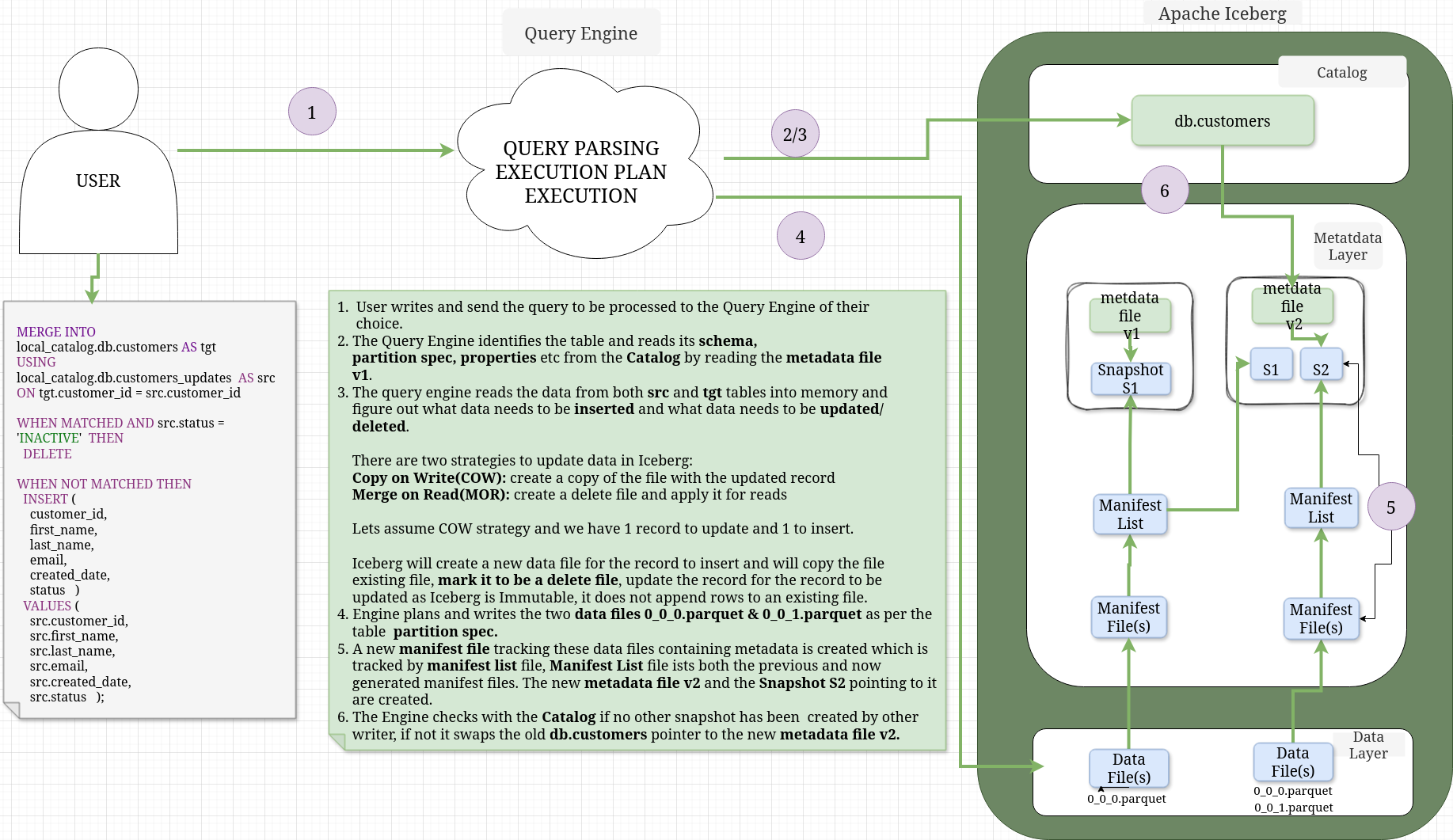
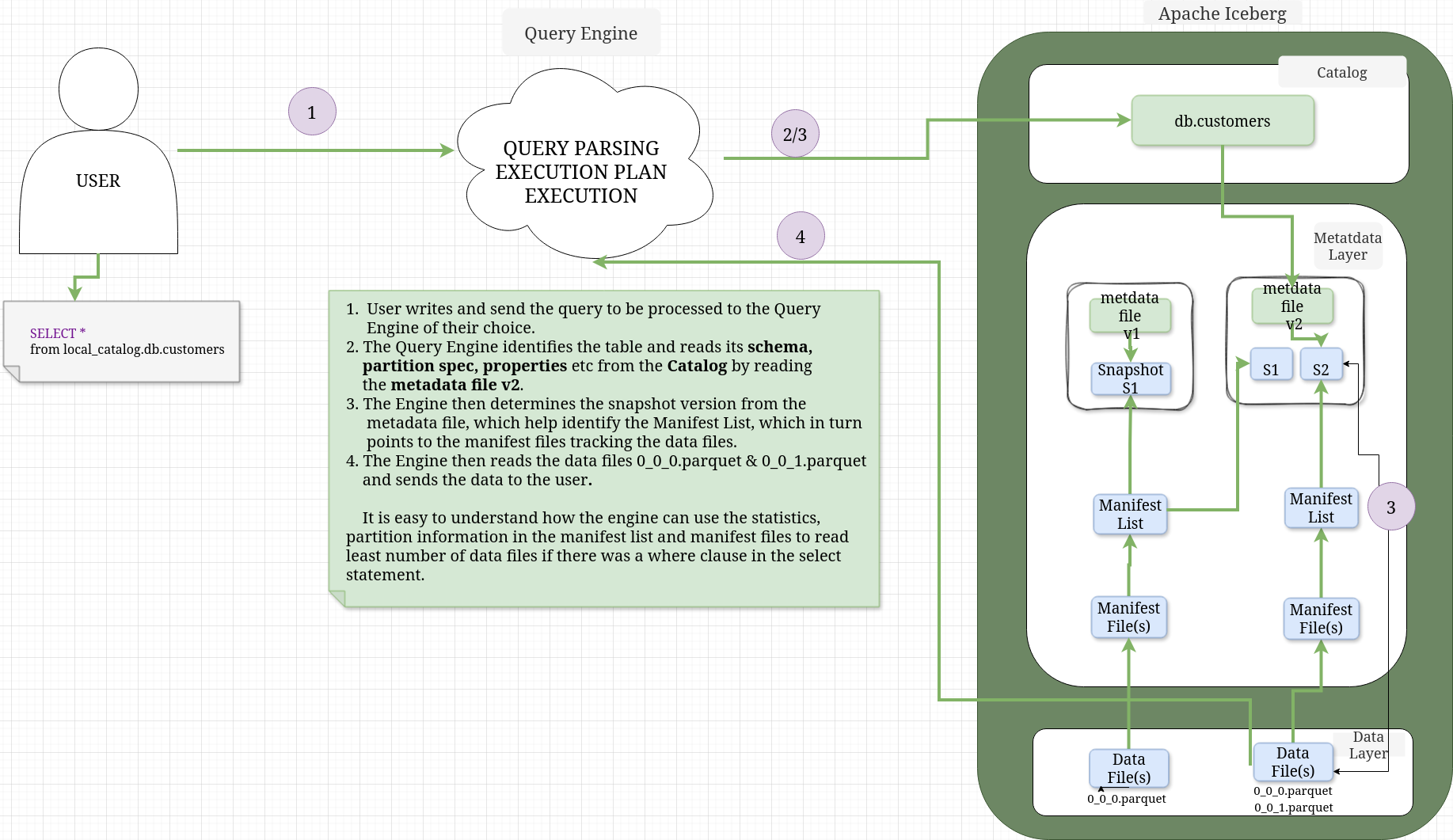
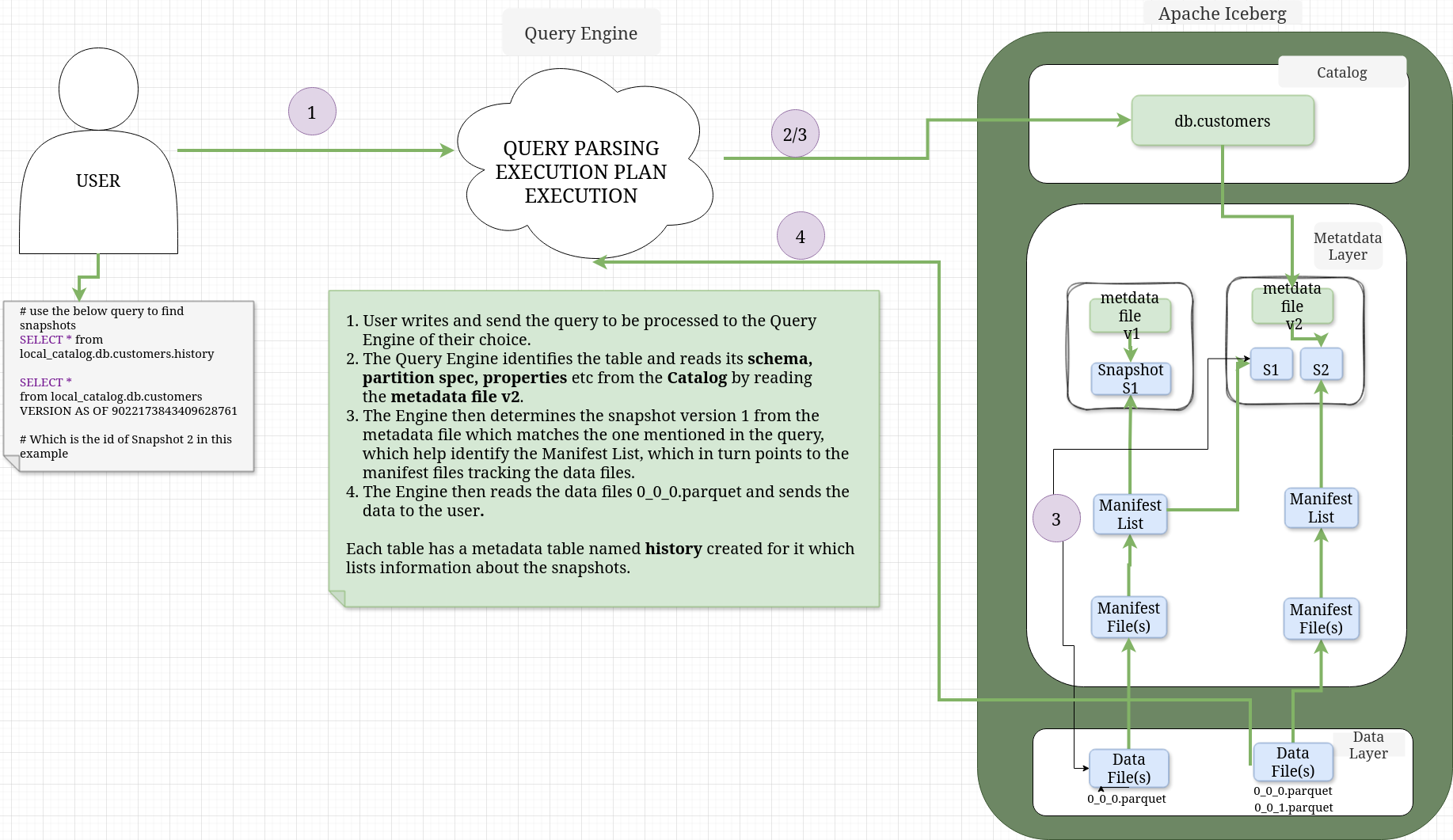
The diagrams are zoomable and I have annotated them enough to explain what happens behind the scenes. I will later use the same queries mentioned on these diagrams in the hands-on section. The queries are executed in order.
CREATE TABLE#
When you execute a CREATE TABLE statement in Apache IcebergTM, the process is primarily about registering intent and structure in the Catalog. Unlike an INSERT, it does not initialize the data layer (Snapshots or Manifests).
The annotated diagram below illustrates the relationship between the components during the initial creation phase.
INSERT INTO#
When you execute an INSERT statement, Iceberg transitions from a “definition only” state to a “state tracking” model. It creates the physical data files and the metadata “tree” (Snapshots and Manifests) to track them.
MERGE INTO#
SELECT#
TIME TRAVEL#
6. Maintenance and Performance Improvement Options#
Compaction#
Iceberg creates many metadata and data files over the lifecycle of a table. Read speed matters for analytics and if iceberg needs to open many files, the speed will suffer. Although Iceberg use metadata to minimize the number of file reads, this can be further reduced by merging many small files into small optimal large files. This process is called Compaction. The idea is to simply re-write files to improve read speeds, so options include to simply rewrite, sort, choose target file size etc. depending on the engine implementing the Iceberg Specification.
Sorting/Clustering#
In Iceberg sorting on a particular column allows data with similar values to be concentrated into fewer files, allowing for more efficient query planning. Iceberg has no concept of global table sort. You can specify a sort order on table properties, but it will be local to the new files, so one needs to run a compaction job to sort table globally.
Partitioning#
When a table is partitioned, records are physically separated by the partition field, so rows with different values are written into different data files rather than just being ordered within the same file. Partitioning in Iceberg is managed on metadata level, so it can be evolved as needed.
Indexing#
There is no traditional indexing similar to databases in Iceberg, but it cleverly uses metadata file and partitioning to achieve the same effect.
Metrics collection#
Iceberg collect column level metrics/statistics in manifest files. In case of wide tables with many columns, metrics collections on all columns can lead to slow read queries.You can turn off/minimize metrics collection for any column in Iceberg by setting specific table properties.
Expire Snapshots and Rewrite Manifests#
Over time your manifest files, snapshots can also grow, so Iceberg offers options to rewrite manifest files and expire snapshots as well.
Bloom filters#
Iceberg offers option to add bloom filters on specific columns in table properties to further speed up reads. A Bloom filter is a space efficient probabilistic data structure that speeds up lookups by ruling out values that cannot exist, with a small chance of false positives.
7. Practical Walkthrough#
Lets see how Iceberg read and write operations work internally by using PySpark and Spark SQL and showing the catalog, metadata file, manifest list, manifest files and the data files.
Tools and Setup#
- pyspark = 3.5.2
- iceberg = 1.10.1
- java = openjdk 17.0.2 2022-01-18
- You can also use pyspark to view avro and parquet files but I did not find the table printing options to be useful. For avro you need to add avro specific package while launching pyspark whereas parquet is supported without any external packages.
The tool I used to view parquet and avro files: Link to Download ↗Just use the same java version and you also need to download javafx from here ↗. I used the version 21.0.10 but it might get updated, so use any 21.0.xx LTS. You can run the program as
java --module-path ~/Downloads/javafx-sdk-21.0.10/lib --add-modules javafx.controls,javafx.fxml -jar ~/Downloads/BigdataFileViewer-1.3-SNAPSHOT-jar-with-dependencies.jar- DBeaver ↗ to view local sqlite database used as catalog. Any latest version should be fine.
- Latest Fedora ↗.
Hands On#
- create a python virtual environment in any directory of your choosing and activate it, as follows.
# create virtual env
python3 -m venv iceberg_venv
source iceberg_venv/bin/activate- Install pyspark version 3.5.2 which is compatible with iceberg version 1.10.1
pip install pyspark==3.5.2- setup JAVA_HOME to point to your openjdk 17 location and update your PATH so that it includes the java binary. For example
export JAVA_HOME=/home/mrde/Downloads/jdk-17.0.2/
export PATH=$JAVA_HOME/bin:$PATH- Run pyspark with the below configuration and packages to include iceberg and sqlite, setup the catalog name to be local_catalog of type jdbc and locations of database to store the catalog and the warehouse, where the metadata and the data files will be stored.
The jdbc.schema-version config allows to work with views in Iceberg. The packages option automatically download the specific versions of the packages mentioned in the command.
pyspark --packages org.apache.iceberg:iceberg-spark-runtime-3.5_2.12:1.10.1,org.xerial:sqlite-jdbc:3.51.1.0 \
--conf spark.sql.extensions=org.apache.iceberg.spark.extensions.IcebergSparkSessionExtensions \
--conf spark.sql.catalog.local_catalog="org.apache.iceberg.spark.SparkCatalog" \
--conf spark.sql.catalog.local_catalog.type="jdbc" \
--conf spark.sql.catalog.local_catalog.uri="jdbc:sqlite:/home/mrde/Downloads/iceberg/spark.db" \
--conf spark.sql.catalog.local_catalog.warehouse=/home/mrde/Downloads/iceberg/warehouse \
--conf spark.sql.catalog.local_catalog.jdbc.schema-version="V1"- Run the below spark SQL statement to create the database db in the catalog.
spark.sql("CREATE NAMESPACE local_catalog.db")CREATE TABLE#
- Create the customers table
  spark.sql("""
CREATE TABLE local_catalog.db.customers (
  customer_id   BIGINT,
  first_name    STRING,
  last_name     STRING,
  email         STRING,
  created_date  DATE,
  status        STRING)
USING ICEBERG
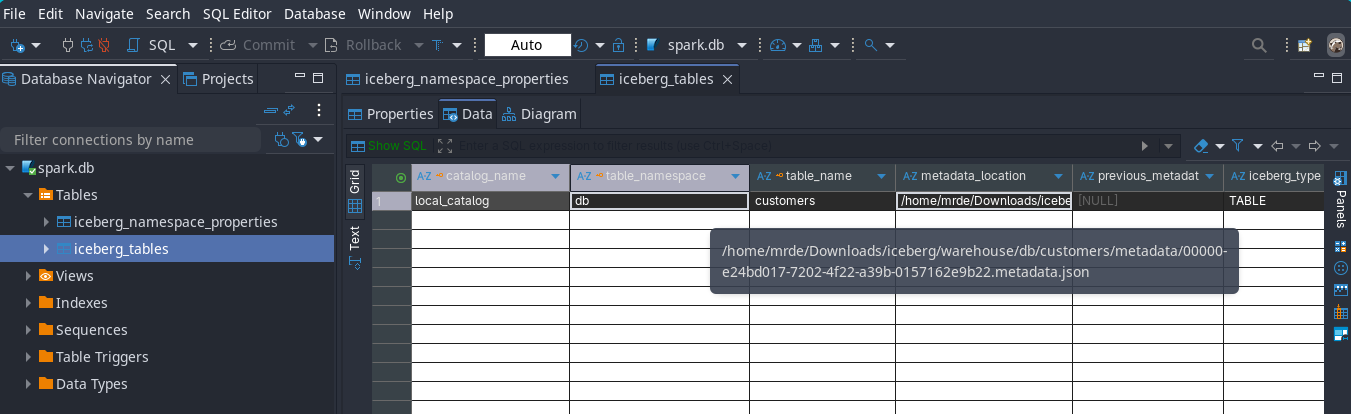
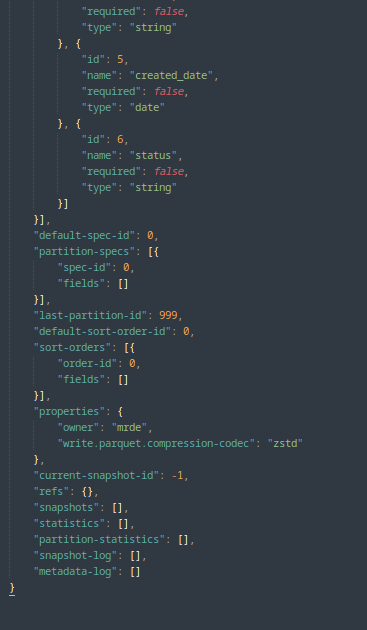
""")As I mentioned in the read and write query section, the create table statement only creates a metadata file and no snapshot,manifest list, manifest file and data files are created as no data is inserted into the table, just a reference from table name to metadata file location is inserted in the catalog as can be seen from below images from the catalog
View the full metadata json file
 {
  "format-version": 2,
  "table-uuid": "c0a9723d-5906-4547-8deb-6723a72062f7",
  "location": "/home/mrde/Downloads/iceberg/warehouse/db/customers",
  "last-sequence-number": 0,
  "last-updated-ms": 1769068430823,
  "last-column-id": 6,
  "current-schema-id": 0,
  "schemas": [{
  	"type": "struct",
  	"schema-id": 0,
  	"fields": [{
  		"id": 1,
  		"name": "customer_id",
  		"required": false,
  		"type": "long"
  	}, {
  		"id": 2,
  		"name": "first_name",
  		"required": false,
  		"type": "string"
  	}, {
  		"id": 3,
  		"name": "last_name",
  		"required": false,
  		"type": "string"
  	}, {
  		"id": 4,
  		"name": "email",
  		"required": false,
  		"type": "string"
  	}, {
  		"id": 5,
  		"name": "created_date",
  		"required": false,
  		"type": "date"
  	}, {
  		"id": 6,
  		"name": "status",
  		"required": false,
  		"type": "string"
  	}]
  }],
  "default-spec-id": 0,
  "partition-specs": [{
  	"spec-id": 0,
  	"fields": []
  }],
  "last-partition-id": 999,
  "default-sort-order-id": 0,
  "sort-orders": [{
  	"order-id": 0,
  	"fields": []
  }],
  "properties": {
  	"owner": "mrde",
  	"write.parquet.compression-codec": "zstd"
  },
  "current-snapshot-id": -1,
  "refs": {},
  "snapshots": [],
  "statistics": [],
  "partition-statistics": [],
  "snapshot-log": [],
  "metadata-log": []
}INSERT INTO#
- Let’s insert some data to the table
spark.sql("""INSERT INTO local_catalog.db.customers (
  customer_id,
  first_name,
  last_name,
  email,
  created_date,
  status
)
VALUES (
  101,
  'Jane',
  'Doe',
  'jane.doe@example.com',
  DATE '2026-01-08',
  'ACTIVE'
);
""")This is what happens
-
If you open the catalog which is stored in spark.db sqlite database with DBeaver you would see that the table name is pointing to the metadata file name and location.
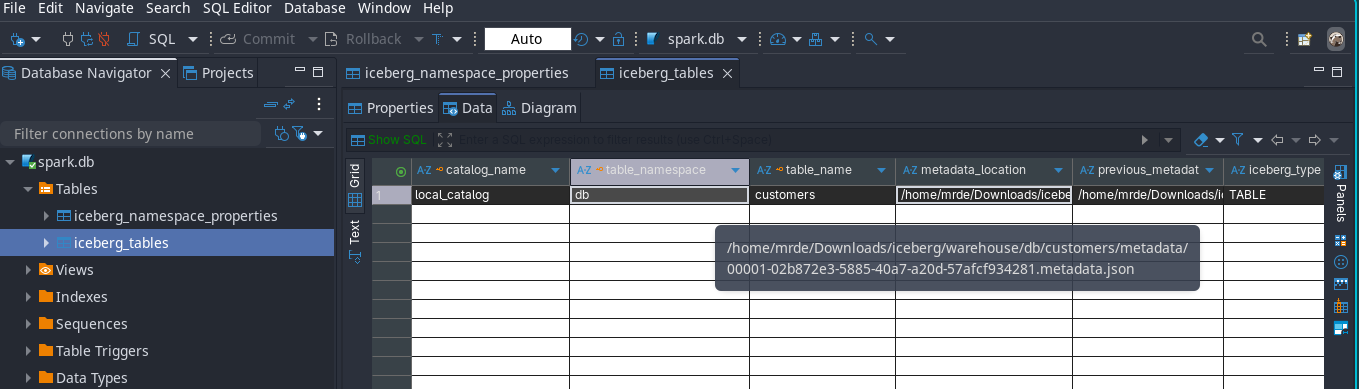
Apache IcebergTM INSERT INTO TABLE metadata location. -
Then if you open the metadata json file with any json viewer, you would find that it lists the manifest list file name and location
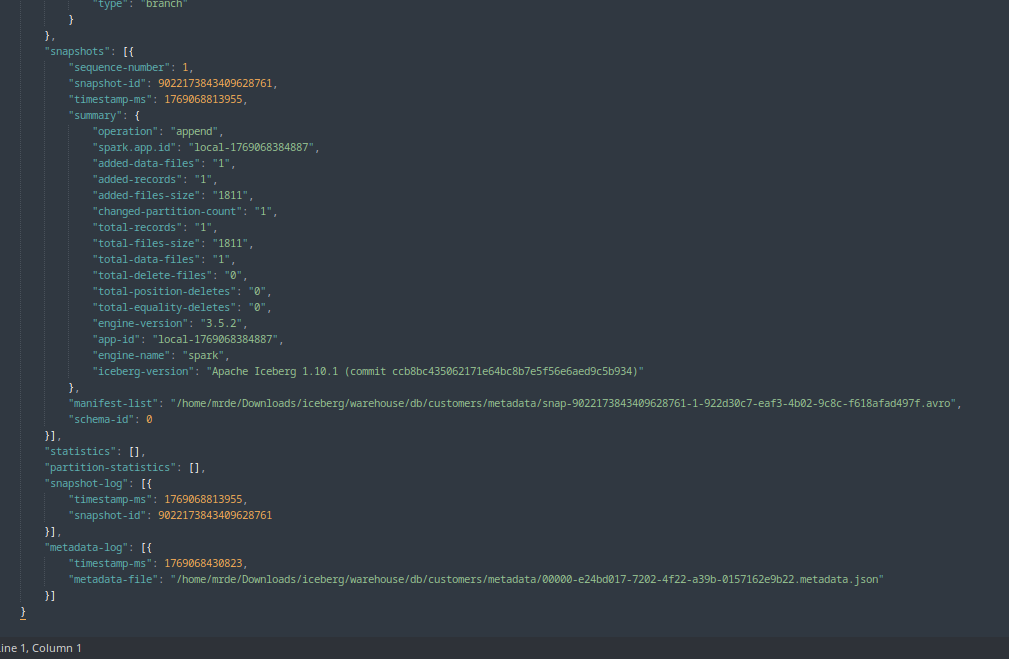
Apache IcebergTM INSERT INTO TABLE manifest list location.
View the full metadata json file
{
  "format-version": 2,
  "table-uuid": "c0a9723d-5906-4547-8deb-6723a72062f7",
  "location": "/home/mrde/Downloads/iceberg/warehouse/db/customers",
  "last-sequence-number": 1,
  "last-updated-ms": 1769068813955,
  "last-column-id": 6,
  "current-schema-id": 0,
  "schemas": [{
  	"type": "struct",
  	"schema-id": 0,
  	"fields": [{
  		"id": 1,
  		"name": "customer_id",
  		"required": false,
  		"type": "long"
  	}, {
  		"id": 2,
  		"name": "first_name",
  		"required": false,
  		"type": "string"
  	}, {
  		"id": 3,
  		"name": "last_name",
  		"required": false,
  		"type": "string"
  	}, {
  		"id": 4,
  		"name": "email",
  		"required": false,
  		"type": "string"
  	}, {
  		"id": 5,
  		"name": "created_date",
  		"required": false,
  		"type": "date"
  	}, {
  		"id": 6,
  		"name": "status",
  		"required": false,
  		"type": "string"
  	}]
  }],
  "default-spec-id": 0,
  "partition-specs": [{
  	"spec-id": 0,
  	"fields": []
  }],
  "last-partition-id": 999,
  "default-sort-order-id": 0,
  "sort-orders": [{
  	"order-id": 0,
  	"fields": []
  }],
  "properties": {
  	"owner": "mrde",
  	"write.parquet.compression-codec": "zstd"
  },
  "current-snapshot-id": 9022173843409628761,
  "refs": {
  	"main": {
  		"snapshot-id": 9022173843409628761,
  		"type": "branch"
  	}
  },
  "snapshots": [{
  	"sequence-number": 1,
  	"snapshot-id": 9022173843409628761,
  	"timestamp-ms": 1769068813955,
  	"summary": {
  		"operation": "append",
  		"spark.app.id": "local-1769068384887",
  		"added-data-files": "1",
  		"added-records": "1",
  		"added-files-size": "1811",
  		"changed-partition-count": "1",
  		"total-records": "1",
  		"total-files-size": "1811",
  		"total-data-files": "1",
  		"total-delete-files": "0",
  		"total-position-deletes": "0",
  		"total-equality-deletes": "0",
  		"engine-version": "3.5.2",
  		"app-id": "local-1769068384887",
  		"engine-name": "spark",
  		"iceberg-version": "Apache Iceberg 1.10.1 (commit ccb8bc435062171e64bc8b7e5f56e6aed9c5b934)"
  	},
  	"manifest-list": "/home/mrde/Downloads/iceberg/warehouse/db/customers/metadata/snap-9022173843409628761-1-922d30c7-eaf3-4b02-9c8c-f618afad497f.avro",
  	"schema-id": 0
  }],
  "statistics": [],
  "partition-statistics": [],
  "snapshot-log": [{
  	"timestamp-ms": 1769068813955,
  	"snapshot-id": 9022173843409628761
  }],
  "metadata-log": [{
  	"timestamp-ms": 1769068430823,
  	"metadata-file": "/home/mrde/Downloads/iceberg/warehouse/db/customers/metadata/00000-e24bd017-7202-4f22-a39b-0157162e9b22.metadata.json"
  }]
}- Now if you open the manifest list avro file with the tool I shared before or any avro viewer you would find out the name and location of the manifest file(s)

Apache IcebergTM INSERT INTO TABLE manifest location. - The manifest avro file above contains the location of the data file(s) which stores the data

Apache IcebergTM INSERT INTO TABLE data file location. - If you view the parquet data file, you can see the data we inserted.

Apache IcebergTM INSERT INTO TABLE data file contents.
MERGE INTO#
- Let’s see now what happens when we run a merge query. The idea is to showcase the delete files and insert in one statement.
- Let’s create a new table and insert some data to it
spark.sql("""CREATE TABLE local_catalog.db.customers_updates (
  customer_id   BIGINT,
  first_name    STRING,
  last_name     STRING,
  email         STRING,
  created_date  DATE,
  status        STRING
);
""")


spark.sql("""INSERT INTO local_catalog.db.customers_updates VALUES
  (
    101,
    'Jane',
    'Doe',
    'jane.doe@newdomain.com',
    DATE '2026-01-10',
    'INACTIVE'
  ),
  (
    202,
    'John',
    'Smith',
    'john.smith@example.com',
    DATE '2025-12-15',
    'INACTIVE'
  );
""")Now let’s merge this new data to the original table
spark.sql("""MERGE INTO local_catalog.db.customers AS tgt
USING local_catalog.db.customers_updates AS src
ON tgt.customer_id = src.customer_id

WHEN MATCHED AND src.status = 'INACTIVE' THEN
  DELETE

WHEN NOT MATCHED THEN
  INSERT (
    customer_id,
    first_name,
    last_name,
    email,
    created_date,
    status
  )
  VALUES (
    src.customer_id,
    src.first_name,
    src.last_name,
    src.email,
    src.created_date,
    src.status
  );
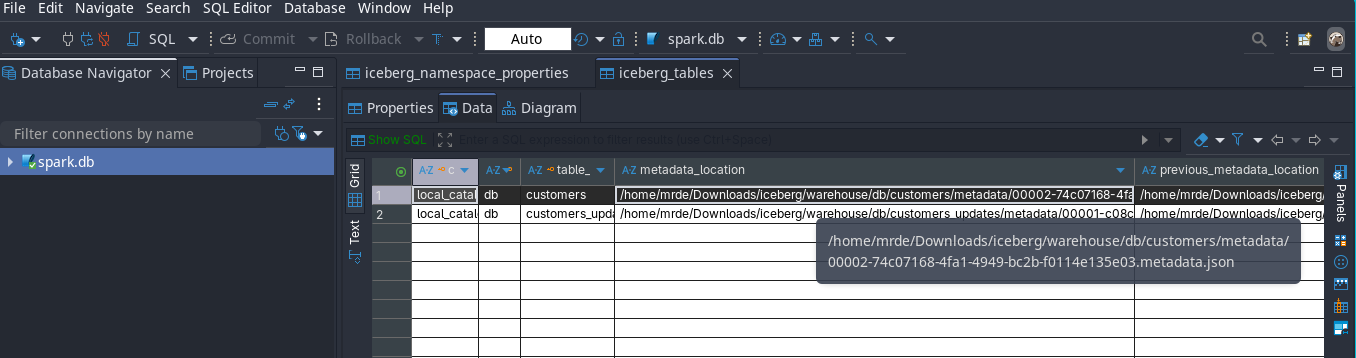
""")As you can see below now that the table is pointing to the updated metadata file
- Then if you open the metadata json file with any json viewer, you would find that it lists the manifest list file name and location
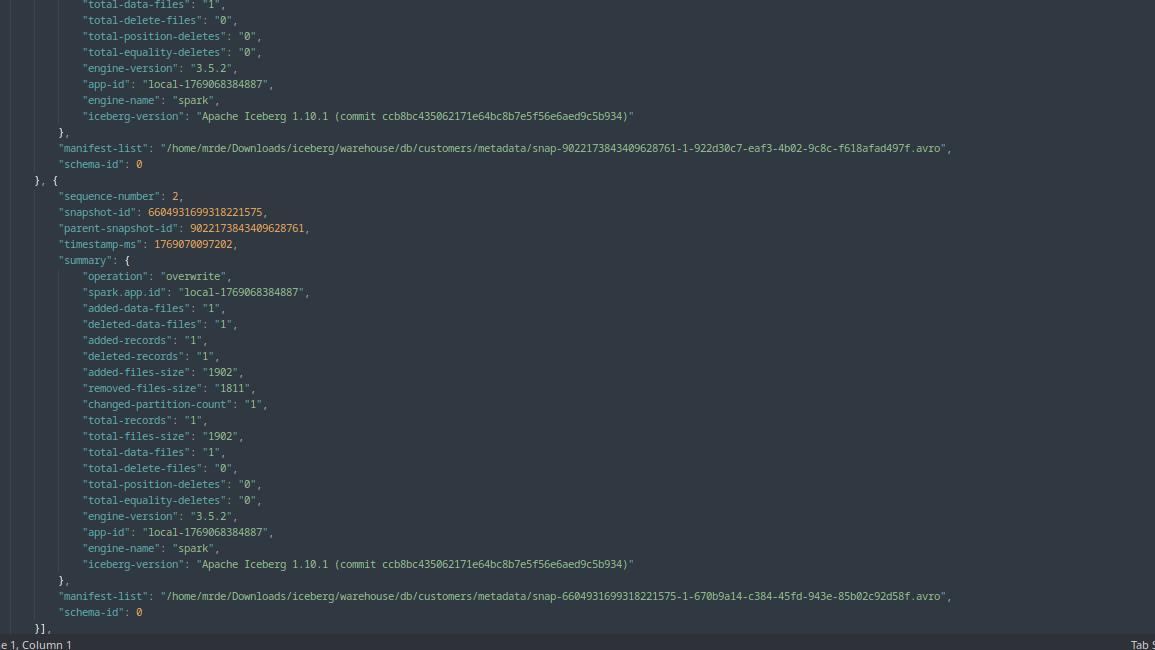
Apache IcebergTM MERGE INTO TABLE manifest list location.
View the full metadata json file
  {
	"format-version": 2,
	"table-uuid": "c0a9723d-5906-4547-8deb-6723a72062f7",
	"location": "/home/mrde/Downloads/iceberg/warehouse/db/customers",
	"last-sequence-number": 2,
	"last-updated-ms": 1769070097202,
	"last-column-id": 6,
	"current-schema-id": 0,
	"schemas": [{
		"type": "struct",
		"schema-id": 0,
		"fields": [{
			"id": 1,
			"name": "customer_id",
			"required": false,
			"type": "long"
		}, {
			"id": 2,
			"name": "first_name",
			"required": false,
			"type": "string"
		}, {
			"id": 3,
			"name": "last_name",
			"required": false,
			"type": "string"
		}, {
			"id": 4,
			"name": "email",
			"required": false,
			"type": "string"
		}, {
			"id": 5,
			"name": "created_date",
			"required": false,
			"type": "date"
		}, {
			"id": 6,
			"name": "status",
			"required": false,
			"type": "string"
		}]
	}],
	"default-spec-id": 0,
	"partition-specs": [{
		"spec-id": 0,
		"fields": []
	}],
	"last-partition-id": 999,
	"default-sort-order-id": 0,
	"sort-orders": [{
		"order-id": 0,
		"fields": []
	}],
	"properties": {
		"owner": "mrde",
		"write.parquet.compression-codec": "zstd"
	},
	"current-snapshot-id": 6604931699318221575,
	"refs": {
		"main": {
			"snapshot-id": 6604931699318221575,
			"type": "branch"
		}
	},
	"snapshots": [{
		"sequence-number": 1,
		"snapshot-id": 9022173843409628761,
		"timestamp-ms": 1769068813955,
		"summary": {
			"operation": "append",
			"spark.app.id": "local-1769068384887",
			"added-data-files": "1",
			"added-records": "1",
			"added-files-size": "1811",
			"changed-partition-count": "1",
			"total-records": "1",
			"total-files-size": "1811",
			"total-data-files": "1",
			"total-delete-files": "0",
			"total-position-deletes": "0",
			"total-equality-deletes": "0",
			"engine-version": "3.5.2",
			"app-id": "local-1769068384887",
			"engine-name": "spark",
			"iceberg-version": "Apache Iceberg 1.10.1 (commit ccb8bc435062171e64bc8b7e5f56e6aed9c5b934)"
		},
		"manifest-list": "/home/mrde/Downloads/iceberg/warehouse/db/customers/metadata/snap-9022173843409628761-1-922d30c7-eaf3-4b02-9c8c-f618afad497f.avro",
		"schema-id": 0
	}, {
		"sequence-number": 2,
		"snapshot-id": 6604931699318221575,
		"parent-snapshot-id": 9022173843409628761,
		"timestamp-ms": 1769070097202,
		"summary": {
			"operation": "overwrite",
			"spark.app.id": "local-1769068384887",
			"added-data-files": "1",
			"deleted-data-files": "1",
			"added-records": "1",
			"deleted-records": "1",
			"added-files-size": "1902",
			"removed-files-size": "1811",
			"changed-partition-count": "1",
			"total-records": "1",
			"total-files-size": "1902",
			"total-data-files": "1",
			"total-delete-files": "0",
			"total-position-deletes": "0",
			"total-equality-deletes": "0",
			"engine-version": "3.5.2",
			"app-id": "local-1769068384887",
			"engine-name": "spark",
			"iceberg-version": "Apache Iceberg 1.10.1 (commit ccb8bc435062171e64bc8b7e5f56e6aed9c5b934)"
		},
		"manifest-list": "/home/mrde/Downloads/iceberg/warehouse/db/customers/metadata/snap-6604931699318221575-1-670b9a14-c384-45fd-943e-85b02c92d58f.avro",
		"schema-id": 0
	}],
	"statistics": [],
	"partition-statistics": [],
	"snapshot-log": [{
		"timestamp-ms": 1769068813955,
		"snapshot-id": 9022173843409628761
	}, {
		"timestamp-ms": 1769070097202,
		"snapshot-id": 6604931699318221575
	}],
	"metadata-log": [{
		"timestamp-ms": 1769068430823,
		"metadata-file": "/home/mrde/Downloads/iceberg/warehouse/db/customers/metadata/00000-e24bd017-7202-4f22-a39b-0157162e9b22.metadata.json"
	}, {
		"timestamp-ms": 1769068813955,
		"metadata-file": "/home/mrde/Downloads/iceberg/warehouse/db/customers/metadata/00001-02b872e3-5885-40a7-a20d-57afcf934281.metadata.json"
	}]
}- Now if you open the manifest list avro file with the tool I shared before or any avro viewer you would find out the name and location of the manifest file(s) and since the merge statement had a DELETE clause, Iceberg will create a delete file, as is evident from the deleted_files_count field value of 1 as shown below

Apache IcebergTM MERGE INTO TABLE manifest location. - The manifest avro files above contains the location of the data file(s) which stores the data as before

Apache IcebergTM MERGE INTO TABLE data file location2. 
Apache IcebergTM MERGE INTO TABLE data file location2.
SELECT#
- Now if you query the table, you would only get the newly inserted record as Iceberg will apply the delete file
spark.sql("select * from local_catalog.db.customers").collect()
TIME TRAVEL#
- Now let’s see how the time travel feature works, don’t forget to change the snapshot version from your own run of the queries.
spark.sql("""SELECT * from local_catalog.db.customers.history""").collect()

spark.sql("""SELECT * from local_catalog.db.customers VERSION AS OF 9022173843409628761""").collect()

spark.sql("""SELECT * from local_catalog.db.customers VERSION AS OF 6604931699318221575""").collect()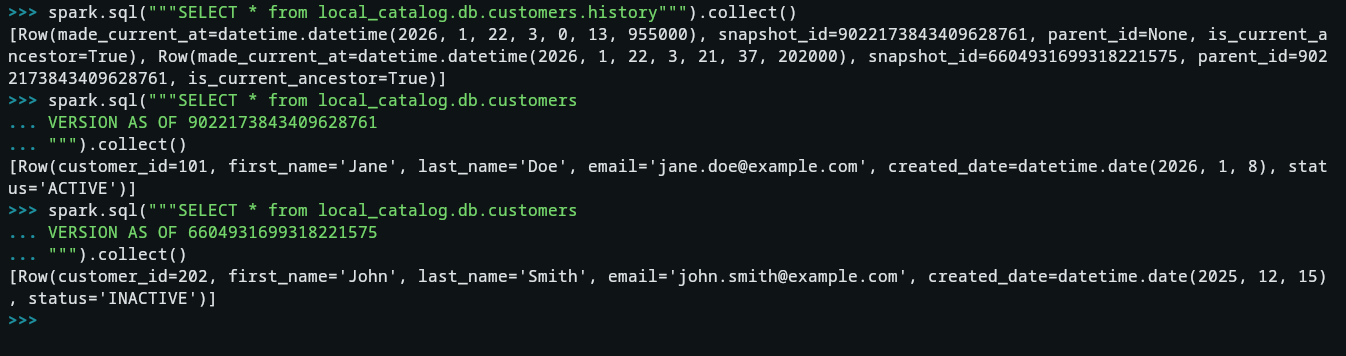
8. Wrap-Up & Key Takeaways#
The evolution from traditional Data Lakes to the Data Lakehouse architecture is driven by the need for speed, reliability, and governance without the burden of vendor lock-in. Apache Iceberg™ has emerged as the industry standard for this transition.
As demonstrated in our practical walkthrough, Iceberg’s metadata-first approach fundamentally changes how we interact with storage. By decoupling the data from the catalog and using snapshots to track state, we gain:
-
Operational Confidence: ACID transactions ensure that failed jobs never leave “dirty” data.
-
Cost Efficiency: Metadata-driven pruning significantly reduces the amount of data read from S3 or HDFS.
-
Future-Proofing: Features like Partition Evolution allow your table structure to grow and change alongside your business logic without requiring a total data rewrite.
In 2026, whether you are managing small analytic tables or multi-petabyte datasets, mastering the Iceberg specification is essential for any modern data engineer.